01
Choose the gift events
Select saved gift events from connected apps and games, or add a gift manually to include it in your overlay.
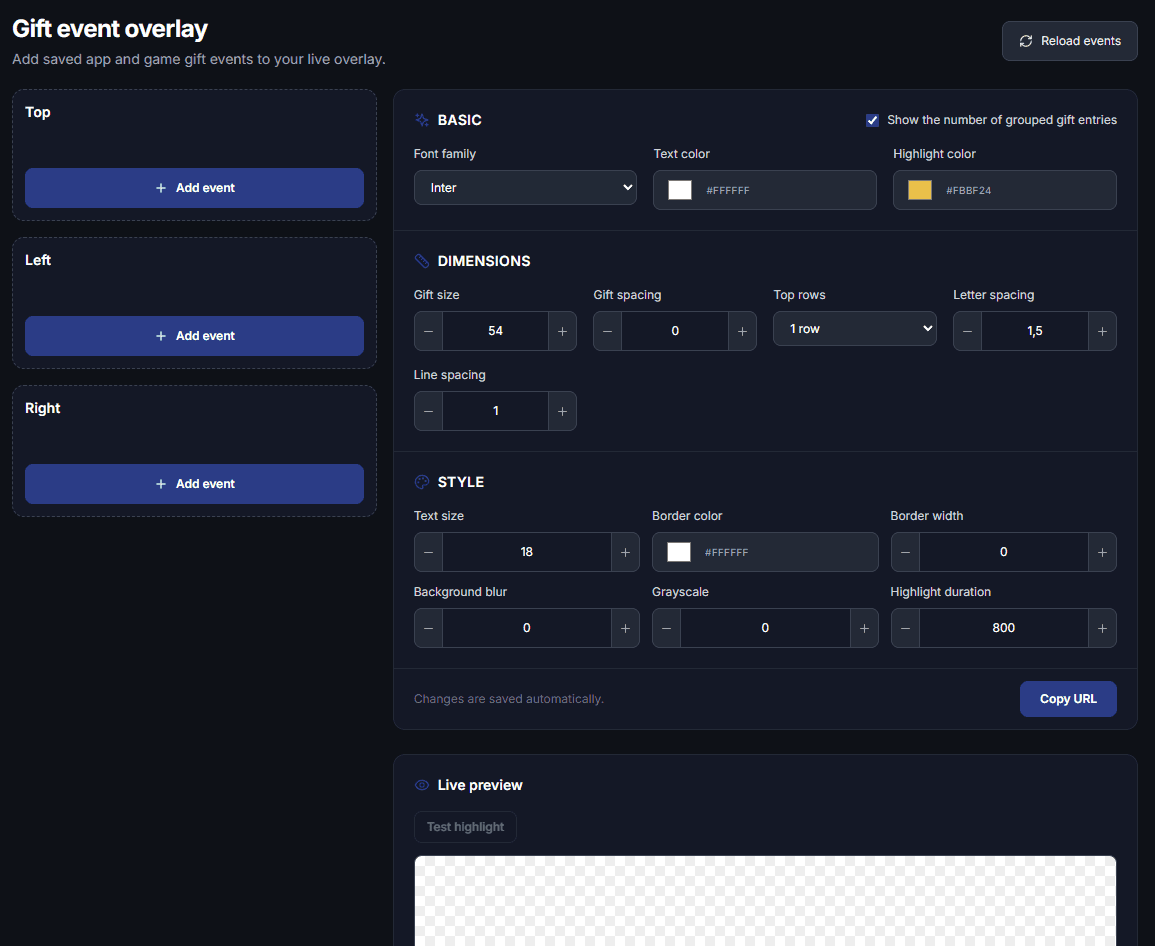
Create your gift overlay in a few simple steps—no Photoshop or design skills needed. Choose saved gift events from your apps and games, or add gifts manually. Place them at the top, left or right, style labels and images, preview your layout live, and copy its browser source URL into OBS or TikTok LIVE Studio.
TikTok gift event overlay
Choose the gift events your community cares about, arrange them where they fit, and see every change in the live preview before using your overlay.
Select saved gift events from connected apps and games, or add a gift manually to include it in your overlay.
Place gifts in the top, left or right zone. Adjust labels, gift images, text and visual settings to fit your stream.
Edit your overlay right in Streamshot, check the live preview, and copy the browser source URL into OBS or TikTok LIVE Studio.
Select saved app or game gift events, or add a gift manually.
Place gifts at the top, left or right and style their labels and images.
Check the live preview, then copy the browser source URL into OBS or TikTok LIVE Studio.
Build your gift event overlay in Streamshot, preview it, and add it to your streaming setup with a browser source URL.
Download free